

 Features
 How it Works?
 Specs
Specs Price
Price Help
Help FAQ
FAQ





Product Screenshots
-
 For IndividualsBack to main menu
For Individuals
-
 Data Recovery
 -
 File Repair
 -
 Data Erasure
-
-
 For BusinessBack to main menu
For Business
-
 Email Repair
 -
 Email Converter
 -
 Email Migration
 -
 File & Database Repair
 -
Data Recovery
-
Data Erasure
-
 Toolkit
 -
 Forensic
-
-
 Lab Services
 -
 Support
Stellar® Migrator for Exchange
Exchange Migration Tool
Seamlessly migrates mailboxes across Exchange Servers and Microsoft 365, supports same and cross domain without the need to run complex PowerShell scripts. Ensure secure mailbox migration with 100% precision and zero downtime.
- Exchange to Microsoft 365 (and vice versa) Migration.
- Exchange to Exchange Migration.
- Exchange to Exchange Server Subscription Edition (SE) Upgrade.

*Register to get 2 Free Mailboxes for Migration
*Register to get 2 Free Mailboxes for Migration

LAZYADMIN
"Stellar Migrator for Exchange simplifies Microsoft 365 tenant-to-tenant migrations with no PowerShell or manual setup. This tool is ideal for IT admins seeking efficiency and compliance."
Top Use Cases
When to Use Exchange Migration Tool?
Seamless Exchange to Exchange Migration
When your organization needs to migrate form one Exchange server to another or consolidate different Exchange versions, the manual methods may not be efficient. These methods require extensive PowerShell scripting, manual mailbox mapping, and server downtime. For an automated migration process, you can use Stellar Migrator for Exchange. The supports both same domain and cross domain migration. It provides zero-downtime migration while offering features like re-run failed migrations to retry only incomplete items, making it a reliable and efficient migration tool.
Learn More
Exchange to Office 365 & Vice Versa Migration

For cost-saving and reduced IT overheads, organizations may want to migrate from on premise Exchange to Microsoft 365. In addition, migrating from Microsoft 365 to on premise Exchange will provide control over the email infrastructure. In both cases, the manual migration process is complex and time-consuming. In this case, using Stellar Migrator for Exchange provides a scalable and efficient solution to migrate without data loss, or complexities. The software removes manual processes, and ensures a smooth migration.
Learn More Effortless Office 365 Tenant-to-Tenant Migration

For mergers or acquisitions, migrating an existing Microsoft 365 tenant to another can be complex and risky, especially with manual methods prone to data loss. Additionally, to migrate mailbox data, you will need to export the data to a PST file, which has several limitations. For a simpler process, you can use Stellar Migrator for Exchange to migrate mailbox data from one Office 365 (Microsoft 365) tenant to another. This tool offers cutover, staged, and hybrid migration support, incremental (delta) migration to prevent duplicate transfers.
Learn More KEY FEATURES OF Stellar Migrator for Exchange
Software Important Capabilities

Supports Cross-Forest, Same Domain, & Cross-Domain Migration
If you are using Microsoft’s native tool for same or cross-domain migration, you need to establish a trust relationship between Active Directory forests. Stellar Migrator for Exchange eliminates this complex setup, allowing direct cross-forest, same domain, and cross-domain migrations using IP addresses and server credentials.

Incremental (Delta) Migration for Efficiency
This Exchange Migration tool provides Delta (Incremental) migration feature. It ensures that only new or modified data is transferred. When you re-run the migration after the full migration, this feature allows you to migrate only the new items received after the initial migration or the items that are not migrated during the previous attempt. This helps in significantly reducing time, efforts, and consumption of resources.

Zero Downtime & Business Continuity
Using manual migration methods require server downtime which disrupts business operations. Stellar Migrator ensures zero downtime and allows users to send and receive emails during the migration. This prevents loss of productivity and eliminates workflow disruptions.

Automated Mailbox Matching
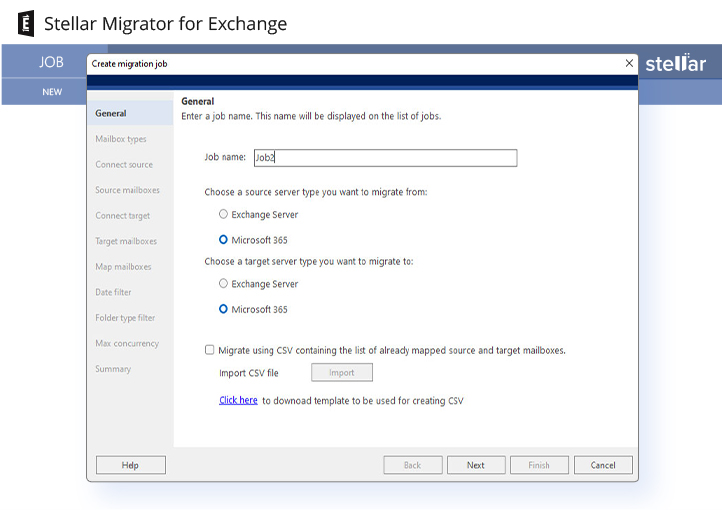
Manual migration methods require mapping mailboxes on the source server to the mailboxes on the target server manually. This process takes a lot of time when you are dealing with various mailboxes. If you use Stellar Migrator for Exchange, you can use the auto-mailbox matching feature to simply map the mailboxes using mailbox ID.

Exchange to Exchange Migration
Stellar Migrator for Exchange makes the migration of primary mailboxes, archive mailboxes, and public folders across various Exchange Server environments simple. It supports migration between different versions of Exchange Server and allows users to easily upgrade or downgrade their Exchange Server. Additionally, the software facilitates cross-domain and cross-forest migrations, ensuring that all critical data is transferred securely and accurately. This tool ensures that migration is performed with no downtime.

Exchange to Office 365 Migration
Stellar Migrator for Exchange can migrate data from on-premises Exchange Server to Microsoft 365 (formerly Office 365). The tool offers an error-free transition of mailbox data from the Exchange Server to the cloud, and maintains data integrity and minimizes downtime. It supports cross-forest, same domain, and cross-domain migrations. It can perform large-scale migrations, ensuring all the mailbox data is transferred to Microsoft 365. This tool simplifies the migration process and is an ideal choice for organizations looking to move to the cloud.

Office 365 to Office 365 Migration
Stellar Migrator for Exchange can migrate mailbox data from one Microsoft 365 account to another. It provides a secure and uninterrupted migration of information between Microsoft 365 tenants. For restructurings, consolidating companies, and transitioning in case of mergers and acquisitions, the software enables an error free migration of mailboxes, including messages, calendars, contacts, and other important information. It maintains data integrity, minimizes downtime, and maintains folder structures and permissions intact. For efficient migration, software enables a secure and accurate migration of all the mailbox data.

Office 365 to Exchange Migration
Stellar Migrator for Exchange also supports Office 365 to Exchange Server migrations across Exchange server 2010, 2013, 2016 and 2019. It helps organizations to move data from the cloud back to the on-premises Exchange environment. This software is best for businesses moving to hybrid servers or returning to on-premise servers. The software can transfer mailbox data, and maintain data integrity with zero downtime. It preserves folder structures, permissions, and metadata during migration.

Cutover, Staged & Hybrid Migration Support
The software allows you to migrate mailboxes in different ways. You can migrate all mailboxes at once, migrate data in batches or migrate in hybrid setting. You only need to configure a migration job accordingly and start the migration process.

Multi-Language Mailbox Support
Stellar Migrator for Exchange supports all languages. Hence, no matter what language the source or the target server has set, the software can easily migrating all the data. This ensures that all the migrated data on the target is similar to the source.

Re-Run Failed or Incomplete Migrations
If while performing the migration, the process fails or you need to stop the migration due to some reason, you can re-run the job and perform full migration. The software will migrate the remaining or failed items to the destination server after you re run the job.

Selective Folder Migration
You can use the software to migrate only specific folder types to the destination server. For this, you need to select the folder name displayed on the software to migrate only this specific type of folder. The folder can be emails, contacts, calendars, notes, tasks or journals.

Seamless Public Folder Migration
Stellar Migrator for Exchange facilitates the migration of mailboxes and public folders between Exchange servers and from on-premises Exchange environments to Microsoft 365 environments. It ensures data integrity and minimal downtime during the migration process.

Hosted Exchange to Office 365 Migration
You can use Stellar Migrator for Exchange to transfer mailboxes from third-party hosted Exchange services to the Microsoft 365 cloud. The software overcomes limited administration privileges of such services and allows you to migrate all source mailboxes by using credentials of a single admin account. Note- Even if you have limited access to Hosted Exchange environment, you can connect and migrate mailboxes individually by using user IDs and passwords.

End-to-End Secure Migration
When you use Stellar Migrator for Exchange, you can be sure that the users’ data is safe as it is fully encrypted during the migration. The software copies mailbox data directly to the selected server and there is no third party involved in the process.

Hassle-Free Configuration
Migrating mailboxes using Stellar Migrator for Exchange, does not require any PowerShell commands in order to perform migration. Additionally the software has a built-in Auto-match feature for matching mailboxes on the source and target end.

Customizable Date-Based Migration
The software has a date filter that allows you to select mail items for migration based on specific date ranges. This is useful for organizations that need to migrate only recent data or data from date range. This reduces the volume of information transferred and focuses on relevant data.

Priority-Based Mailbox Migration
While migrating the mailboxes using Stellar Migrator for Exchange you can assign a priority number to each mailbox to set up the migration order. Using this feature, you can migrate the important mailboxes first and schedule others for later.
Stellar Migrator for Exchange
Effortlessly upgrade to Microsoft 365

Product Video
Technical Specifications

About Product
Stellar Migrator for Exchange
| Version: | 2.0.0.0 |
| Edition: | Technician |
| Language Supported: | English |
| Release Date: | Oct, 2025 |
System Requirement
| Processor: | Intel compatible (x64-based processor) |
| Memory: | 8 GB minimum (16 GB recommended) |
| Hard Disk: | 250 MB of free space |
| Operating System: (64 Bit only) |
Windows 11, 10, 8.1, 8 & Windows Server 2022, 2019, 2016, 2012 |
| Exchange Server Support: | Exchange Server Subscription Edition (SE), 2019, 2016, 2013, 2010 |
Documents
 Installation Guide
  User Manual
  Knowledge Base
 Product Related Articles
Pricing
Stellar Migrator for Exchange
TRY BEFORE YOU BUY
Free Trial
$0
- 2 Mailboxes Free
- 100% Safe & Secure to Use
- Free support during migration
Migration Plans
Mailbox Pricing
$7 Per Mailbox
$350
 Installation
 Uninstallation
 EULA
EULAFAQ
Q. What migration scenarios does Stellar Migrator for Exchange support?
A.
Stellar Migrator for Exchange provides supports for the following scenarios:
- Exchange Sever to Exchange Server
- Exchange Server to Microsoft 365
- Microsoft 365 to Exchange Server
- Microsoft 365 tenant to tenant migration
- Exchange to Exchange Server Subscription Edition (SE) Upgrade
Q. How to check mailbox migration status?
A.
You can check the real-time dashboard with detailed mailbox migration progress. Log report can also be downloaded from the software.
Q. Can Stellar Migrator for Exchange auto-map source and target mailboxes?
A.
Yes, this Exchange migration tool offers both automatic and manual mailbox mapping options. The software automatically matches source and target mailboxes using email addresses, also allows to manually map them for a seamless, efficient migration to Microsoft 365 or another Exchange Server.
Q. Can I use mapped CSV file of source and target mailboxes for migration?
A.
Yes, you can use a mapped CSV file of source and target mailboxes for migration. You need to be sure that the CSV file follows the format for proper mapping which you can download from Stellar Migrator for Exchange software.
Q. Does Stellar Migrator for Exchange support incremental migration?
A.
Yes, the software supports incremental (delta) migration, allowing it to transfer only new data after an initial sync, which is crucial during complex Exchange to Microsoft 365 or Exchange to Exchange migration.
Q. How is the license count determined when migrating mailboxes?
A.
Stellar Migrator for Exchange determines the license count based on the number of source mailboxes you migrate. Each source mailbox uses 1 license.
Q. How do I prepare my environment for the migration?
A.
The preparation will vary with the server configurations. For details on migration requirements and pre-migration steps, go to this user's manual and choose your migration scenario. Stellar Tech team will guide you at each step - from starting to end.
Q. Can I exclude certain mail items and folders from the migration process?
A.
Yes, you can select specific mail items & folder types, and exclude unnecessary data from being migrated.
Q. Are migrations from Hosted Exchange supported?
A.
Stellar Migrator for Exchange supports all third-party hosted Exchange services to Office 365. You just need to follow the below steps:
- The admin account used in the program should have the ApplicationImpersonation role to all source mailboxes you want to migrate.
- You need to create a CSV file with a list of matched source and target mailboxes.
Note: You will also able to connect and migrate mailboxes individually with user IDs and passwords even when you have limited access to Hosted Exchange environment.
Q. Is there a free trial of Exchange Migration tool?
A.
Yes, Stellar Migrator for Exchange offers a free trial that allows you to migrate up to 2 mailboxes at no cost to evaluate the software. The trial has no feature limitations and all migration capabilities are available.
Q. Does Exchange migration tool migrate mailboxes over 100 GB to O365?
A.
There is always a challenge to migrate large mailboxes, especially archives public folders. Stellar Migrator for Exchange is specialized tool to migrate large mailboxes, including primary, archives, and public folders. The software supports migrating large mailboxes over 100 GB to Microsoft 365
Q. What necessary permissions are required for Manual App Registration to successfully connect source and target tenants?
A.
To successfully connect source and target tenants via manual app registration for migration, specific application permissions must be granted in both the tenants. You need to login with the user having Global Administrator rights.
Q. Can I get a volume discount when purchasing licenses?
A.
The discount typically depends on the number of the mailboxes. You can directly contact our team.
Q. How does Stellar Migrator for Exchange handle failed mailboxes? Are these mailboxes counted as additional licenses?
A.
Stellar Migrator for Exchange handles failed mailboxes by showing real-time errors, allowing you to fix issues and re-run just those specific mailboxes. You can typically re-migrate them using the existing licenses within the same job without needing new ones.
Q. How long does a mailbox migration typically take?
A.
The migration time with Stellar Migrator for Exchange depends on mailbox size, number of items, network speed, and server performance. Small mailboxes may take minutes to a few hours, while large mailboxes (50–100 GB or more) can take several hours. Our Technical team can help you on this.
Q. Can I migrate large number of mailboxes from one Exchange Server to Exchange Server Subscription Edition (SE) within the same domain?
A.
The software is designed for large-scale migrations when moving from one Exchange Server to SE within the same or different domains, offering features like delta migration and CSV bulk moves.
Q. What type of support do you offer for the product?
A.
We provide free support during migration. We have experts who can make your migration projects and job easy.
Q. Does Stellar Migrator for Exchange affect data on the source server?
A.
There is no impact on source server data, as the data is directly copied from source server to target server, which is totally safe and risk free.
Q. Are there any disruptions during the mailbox migration process?
A.
There is no disruption. Data is being moved from one live server to another live server.
WHY STELLAR® IS GLOBAL LEADER
Why Choose Stellar?
-
0M+
Customers
-
0+
Years of Excellence
-
0+
R&D Engineers
-
0+
Countries
-
0+
Partners
-
0+
Awards Received