 Buy Now
 Free Download


 Features
 Testimonials
 How it Works?
 Price
Price Reviews
 Specs
Specs Help
Help FAQ
FAQ



Step 1
: Select File Type
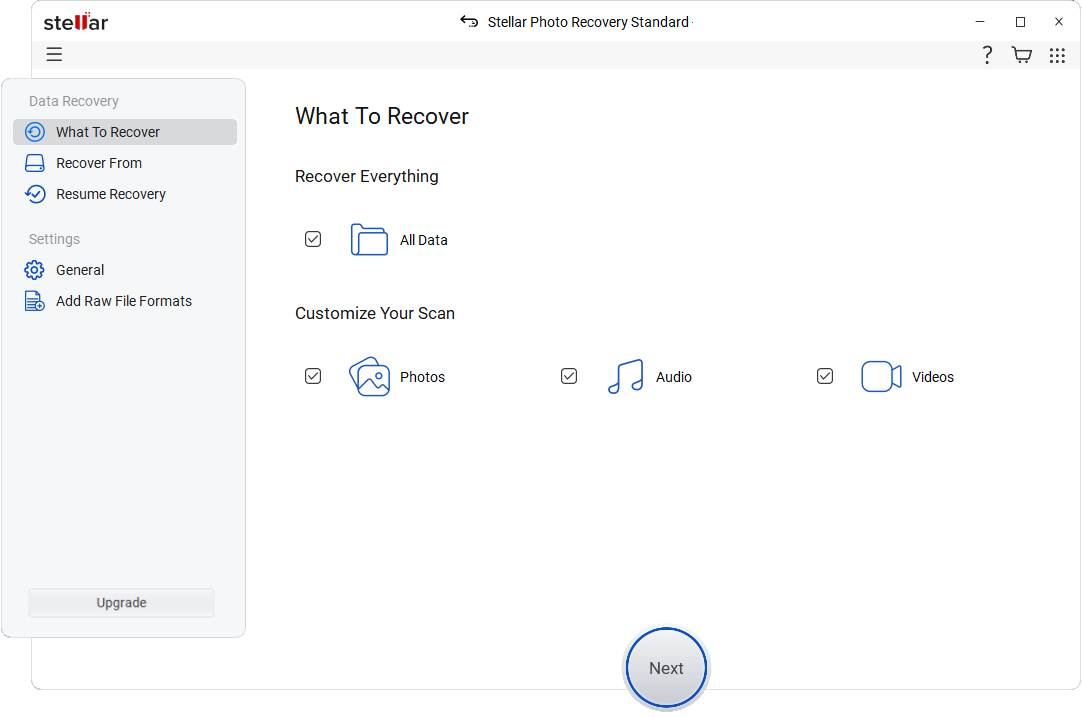
Select the type of data that you want to recover and click 'Next.'
 For Individuals
For Individuals
 Data Recovery
 File Repair
 Data Erasure
  For Business
For Business
 Email Repair
 Email Converter
 Email Migration
 File & Database Repair Data RecoveryData Erasure
 Toolkit
 Forensic
 Lab Services
  Support
*Software works only on your Desktop/Laptop

"Stellar Photo Recovery is Incredibly effective and effortless software to use & has the potential to rescue you from most data loss scenarios."

Stellar Photo Recovery for Windows v12.3.0.2 Launched
Enhanced RAW and new file format support for more comprehensive, reliable recovery result you can trust. See What’s New

STELLAR PHOTO RECOVERY
Stellar Photo Recovery (previously known as Stellar Phoenix Photo Recovery) recovers lost or deleted photos, videos, and audio of any file formats from different types of digital cameras and storage devices.


 HDD/ SSD
Supports all major hard/SSD drive brands.
HDD/ SSD
Supports all major hard/SSD drive brands.
 External Drive Works seamlessly with top external drive brands.
 USB Works with all major USB drive brands.
  Drones
Compatible with all Drones brands.
Drones
Compatible with all Drones brands.  SD Card Compatible with all major memory card brands.
  CCTV Compatible with leading CCTV brands.
ONE-STOP SOLUTION FOR ANY PHOTO RECOVERY NEEDS

Undelete your seemingly lost photos and media files from damaged/corrupted / inaccessible memory card, SD card (Mini, Micro, SDHC, and SDXC), memory stick, compact flash, CF card, CFast, CFast Express, SmartMedia, MultiMediaCard, XQD memory card, eXtreme (xD)-picture card, Eye-Fi WiFi SD card, P2 card and more. The software supports all kinds of SD cards from Samsung, SanDisk, Transcend, Lexar, Toshiba, Patriot, Kingston, Polaroid, Panasonic, Duracell, Verbatim, etc.

Stellar Photo Recovery tool recovers photos lost from all kinds of storage media. It supports the recovery of CR2 /CR3/CRW (Canon), ERF (EPSON ), RAF (Fujifilm), K25 /KDC /DCR (Kodak), MRW (Konica Minolta), MOS/MEF (Mamiya), NEF/ NRW ( Nikon), ORF (Olympus), RAW (Panasonic), PEF (Pentax), SR2/ARW/ SRF (Sony), X3F (Sigma), DNG, DJVU, PGM, Adobe EPS (Mac), Adobe EPS (Windows), TGA, JPEG, TIFF (Motorola and Intel), BMP, GIF, PNG, PSD, INDD, PSP, PCT, JP2, and other file formats.

Stellar Photo Recovery supports recovery of MP4, 3GP, AVI, MPEG, Matroska Video File (MKV), AVCHD Video File (MTS), Divx Encoded Movie File (DIVX), MOI Video File, Video Object File (VOB), OGM, 3G2, ASX, MTS, AJP, F4V, VID, TOD, HD MOV, MOV, MQV, M4B, M4V, WMV, MXF movies and SVI video formats. In addition, it can retrieve RPS, MP3, AU, WAV, MIDI, OGG, AIFF, RM, WMA, RA, M4P, M4A, ACD, AMR, AT3, CAFF, DSS, IFF, M4R, NRA, and SND files audio files.

The software retrieves lost videos, photos, and audio files from BitLocker encrypted drives, volumes, and partitions. Just select the encrypted storage drive in the software, click ‘Scan’ and enter the BitLocker password. The software begins the recovery process from the encrypted HDD, SSD, flash drive, or SD card. It supports all brands including, HP®, Samsung®, Seagate®, Toshiba®, WD®, Transcend®, SanDisk®, Lexar®, LaCie®, Kingston®, Corsair®, Verbatim®, Silicon Power®, Integral®, Lenovo®, Huawei®, and more.
SUCCESS STORIES
OTHER FEATURES

The image recovery software lets you save the directory tree structure generated after a drive/volume scan to a desired location on the disk. The information is saved as a file that can be used to regenerate the tree structure of the found files/folders or to resume recovery at a later stage. You can choose to save the result of the complete procedure or stop the scan at any time and save the information up to that point.

If you’re unable to see the file format of the items you wish to restore in the supported file types list in the image recovery software, you can either edit any of the existing file types or add new file headers manually or automatically. This feature makes the product the best photo recovery software available in the market. It gives the application extended flexibility and increases its utility.

View the found multimedia files in three different ways - File Type, Tree View, and Deleted List. Sorted and easy-to-view scan results help in quickly identifying the relevant photos, videos, and audio files for recovery. File Type view groups file according to photos, videos, and audio. Tree View allows you to navigate to the media file location. You can view and restore only the deleted files from the Deleted List.

The software has emerged as the most loved tool among photographers and videographers, as it supports the recovery of RAW files from any make/model of digital camera. It is also popular among users of Adobe®, Lightroom®, Photoshop®, and other photo editing tools as it supports the recovery of graphics, logos, drawings, and illustrations, during post-processing photo or video loss.

The picture recovery software also comes in Professional and Premium editions. The Professional version is a complete photo restoration tool that not only restores deleted photos and videos but also repairs damaged pictures. The Premium Edition also repairs unlimited corrupt, damaged, or distorted videos and photos from any device. It is a great utility for photographers, videographers, and video agencies engaged in video shooting, filming, editing, etc.

Stellar Photo Recovery provides SMART information about your storage drive, volume, or partition. SMART data reveal your hard disk’s health and temperature indicating HDD wearing signs of drive if any. This helps you to take a timely backup of the drive and prevent future data loss.

Most of the photo recovery tools available in the market fail to work properly on devices that have large storage capacities. However, the deleted photo recovery software from Stellar helps you to restore recently or permanently deleted photos from media with sizes as huge as 18TB and more.

Stellar Photo Recovery restores deleted or lost photos, videos, and audio files from 4K hard disks that store data in a 4096 bytes sector. The photo recovery tool can quickly scan 4K sector storage drives configured to FAT32, ExFAT, HFS+, NTFS, or APFS, file system.
The software provides a preview of lost and deleted photos, videos, and audio of all file formats, including JPEG, RAW, TIFF, PNG, MP4, MOV, FLV, MKV, MP3, OGG, and other file types while scanning the storage media. It displays a full-screen preview of the recoverable videos.

The photo recovery software now offers three different UI themes – Dark, Light and Vibrant with an all-new user-friendly UI. There are tons of smartly built utilities within the interface - Runtime File Preview, Neat and Sortable Scan Results, Multiple File Saving Options, etc. for you to explore.
The latest 'Pause and Resume Scan' feature allows pausing a scan and resuming at a more convenient time. You can preview and restore files from NTFS, ExFAT, FAT32, Linux, APFS, HFS+, and BTRFS file systems while a scan is still in progress without any hassle.
Software Walkthrough
Select the type of data that you want to recover and click 'Next.'
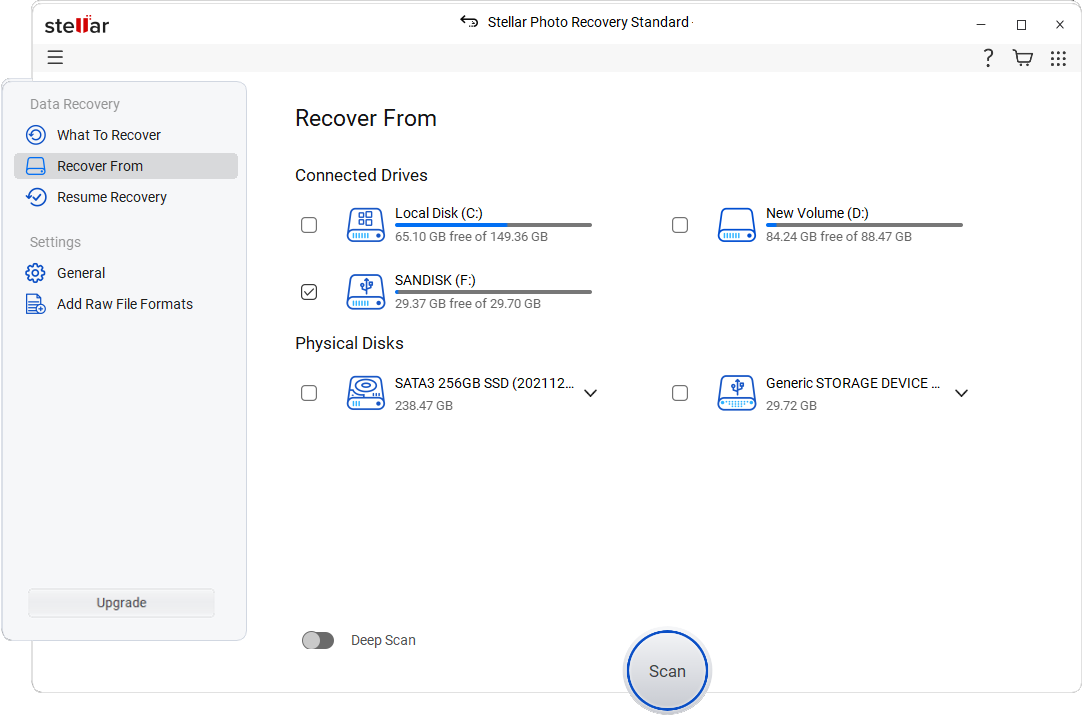
Select the drive or folder location and click 'Scan.'
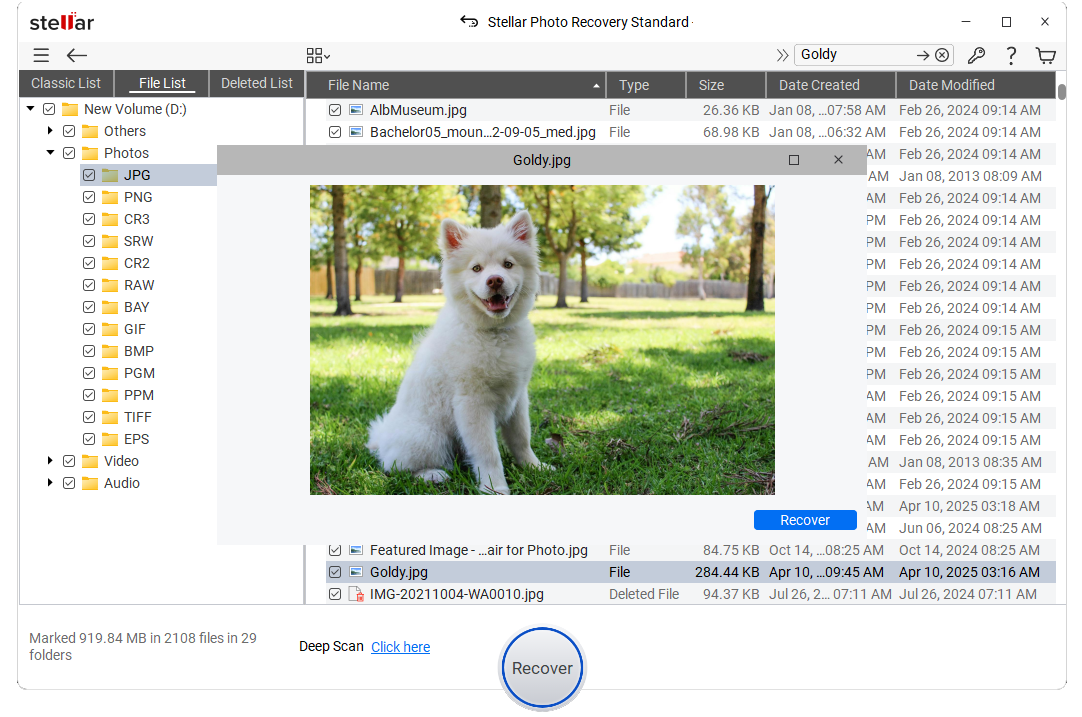
Select files after the scan and click 'Recover' to save recovered data.
 WATCH NOW
PRICING
CUSTOMER REVIEWS




Stellar Photo Recovery has the potential to rescue you from most data loss scenarios, and with incredible ease.
Rescue deleted images or video from any memory card or hard drive - it's no problem with Stellar Photo Recovery.
See Digital Camera World Review

An Easy Way to Reclaim Your Precious Photos
Stellar Photo Recovery is a fantastic option for photographers and videographers looking to recover files.
See Digital Photography School Review

We found the software to be capable of recovering files from an old storage drive that we had previously discarded as unusable.
We found the software to be capable of recovering files from an old CompactFlash card that we had previously discarded as unusable.
See Photo Review Review

Stellar Photo Recovery does what it promises to do, and pretty quickly too.
Inexpensive and effective way to recover precious photos and files that have seemingly been lost forever.
See Photography Blog Review
DATA SHEET

| Version: | 12.3.0.2 |
| License: | Single System |
| Edition: | Standard, Professional, Premium, & Technician |
| Language Supported: | English, Deutsch, Français, Italiano, Español, 日本語 , 한국어, Português Brasileiro, Dutch, हिंदी, 中国人 |
| Release Date: | October 2025 |
| Processor: | Intel compatible (x64-based processor) |
| Memory: | 4 GB minimum (8 GB recommended) |
| Hard Disk: | 250 MB for installation files |
| Operating System: (64 Bit only) |
Windows 11, 10, 8.1, 8 and Windows Server 2022, 2019, 2016 |
TRY BEFORE YOU BUY
USEFUL ARTICLES
FIND YOUR ANSWERS
Yes, it is possible to recover deleted photos after emptying the recently deleted or trash folder, as long as the data has not been overwritten.
Yes. You can often recover deleted photos from digital cameras like Nikon, Sony, Canon, Samsung, etc., by using Stellar Photo Recovery.
Yes. You can run Stellar Photo Recovery Software to recover all your photos and videos from a corrupted or damaged SD card.
It is highly possible that your SD card has got corrupt. There are number of possibilities leading to a SD card corruption/data loss such as system incompatibilities, damage due to mishandling, driver failures, write-protection, etc. Read our guide to know about the simple solutions for SD card recovery.
Yes, Stellar photo recovery software is 100% safe & secure.
You can use Stellar Photo Recovery software to recover your photos. Just install the software, connect your formatted SD or microSD card, scan it, and restore the recovered photos to a desired location.
Yes, if a broken SD card is detectable by the system as well as by the Photo Recovery software, then recovery is possible. However, if SD card is bent, burn, broken connectors and not detected by system then you need to look for the Stellar data recovery services. We use specialized hardware techniques to extract the files directly from external storage devices.
Yes, Using Stellar Photo Recovery you can recover popular RAW formats such as CR2, NEF, ARW, DNG, and more allowing you to restore high-quality original.
Stellar Photo Recovery supports recovery of popular photo, video, and audio file formats, including JPG, PNG, MP4, MOV, AVI, MP3, and RAW camera formats like CR2, NEF, ARW, DNG, and more. It also allows custom file type scanning for uncommon or new formats.
Yes, it’s possible, as long as the photo data hasn’t been overwritten. Stellar Photo Recovery deeply scans the device to locate and recover old deleted photos.
With Stellar Photo Recovery Free edition, you can recover 10 media files upto 100MB each for free. Whereas, Paid editions let you recover unlimited photos and other files.
Yes, Stellar Photo Recovery software recovers photos from a write-protected memory card, provided you know the password.
Yes, Stellar Photo Recovery software is available for both Windows and macOS.
Just open the recycle bin, look for the photos you want to recover. Right-click on that photo and click "Restore". This will restore the photos to its original location.
Yes. You can recover specific files after successful scanning of the drive/media. From the list of found files that appear after scanning, select your specific file types and click Recover to save the files.
No. Choose a different drive to save the recovered photos. If you choose the same drive, it will lead to overwriting, which in turn will result in permanent loss of photos.
To ensure successful photo recovery stop using the storage disk as soon you realize the loss or deletion of photos. Any further use of the drive can overwrite the deleted photos and make it impossible for a software to restore them. Plus, always use an efficient and reliable photo recovery tool that restores files even in tough data loss situations, without affecting the original quality.
To recover photos from a drive having bad sector, first create the image of drive using 'Create Image' feature of the software. Then scan that image to recover your lost photos.
To recover photos from saved scan information follow the below steps:
Yes, Stellar Photo Recovery software fully supports dual-screen setups for an effortless recovery.
WHY STELLAR® IS GLOBAL LEADER
0M+
Customers
0+
Years of Excellence
0+
R&D Engineers
0+
Countries
0+
PARTNERS
0+
Awards Received





Listening...
 Installation
  Uninstallation
  EULA
EULA Knowledge Base
